
Computer Basic: Learn Computer - Google Play
You'll be able to see results in few seconds.
Publisher Description


Learn computer basics step by step: hardware, Windows 11, Mac, files and safety
Computer Basic is a friendly guide to computer basics for complete beginners, updated for 2026.
Learn computer skills step by step: what is inside a PC, how to use Windows 11 and macOS, files and folders, and how to stay safe online. It all works offline.
The guide has 49 topics in 13 sections. Each topic explains one idea in plain language, with numbered steps and menu paths for Windows and Mac, and many end with a quick check to test what you have learned.
What you will learn
• Getting Started: what is a computer (input, processing, output and storage), hardware and software, types of computers, and turning on, signing in and shutting down
• Inside the Computer: the processor (CPU), memory (RAM), storage with SSDs and hard drives, bits, bytes, GB and TB, graphics, motherboard and power
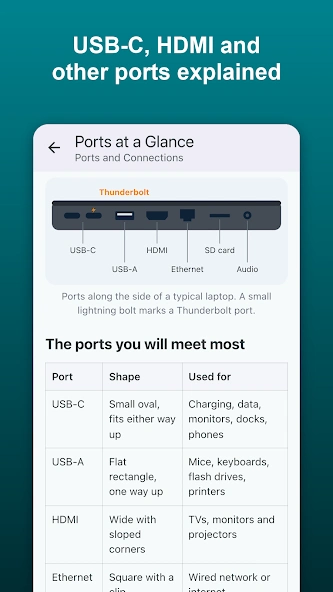
• Ports and Connections: USB-C and Thunderbolt, HDMI and other screen, sound and network cables, Wi-Fi and Bluetooth
• Screens and Input: screens and monitors, the keyboard, mouse and trackpad, touch screens and pens, webcams and headsets
• Operating Systems: what an operating system does, Windows 11 basics, Windows 10 support status, macOS basics, ChromeOS and Chromebooks, Linux, Android, iOS and iPadOS
• Files and Folders: folder trees, file paths, file extensions, and how to copy, move, rename and delete files
• Apps: what apps are, installing apps safely, updating and uninstalling apps
• Cloud, Backups and Internet: the cloud, backups and the 3-2-1 rule, internet and email in brief
• Everyday Skills: keyboard shortcuts for Windows and Mac, printing and scanning, accessibility features
• Troubleshooting: frozen apps and restarting, a slow computer, no sound, no picture or no Wi-Fi
• Staying Safe: updates and built-in protection, passwords and passkeys, spotting scams and fake virus warnings
• Buying and Care: buying a computer, which specifications matter, and caring for your computer
• Glossary and FAQ: 66 computer terms in plain words and answers to 13 questions beginners often ask
Features
• 49 topics in 13 sections, from the first switch-on to troubleshooting
• 16 original illustrations: inside a computer, ports, the keyboard, the mouse, the Windows 11 and Mac desktops, a folder tree, the 3-2-1 backup rule, a fake virus warning and more
• 51 quick-check questions with tap-to-reveal answers
• Numbered steps and menu paths for Windows and Mac
• A searchable glossary of 66 terms
• Search all topics from the home screen
• Dark mode
• Works offline, no account needed
• Available in 8 languages: English, Español, Português, Français, Deutsch, العربية, हिन्दी and Bahasa Indonesia
Who it is for
• Complete beginners who want to learn computer basics at their own pace
• Older adults and parents who want to feel more confident with a computer
• Students starting a basic computer course or computer fundamentals class
• Anyone moving to Windows 11 or a Mac, or buying a new computer
• Family members and teachers who help others learn computer skills
Computer Basic is an independent study aid. It is based on the official support pages of Microsoft, Apple and Google and on advice from national cyber security agencies. It is not affiliated with or endorsed by Microsoft, Apple, Google or any computer maker. Windows, macOS, ChromeOS and other names are trademarks of their respective owners. Menus and features can vary by version, device and region.
About Computer Basic: Learn Computer
The company that develops Computer Basic: Learn Computer is Binary Tuts. The latest version released by its developer is 1.0.
To install Computer Basic: Learn Computer on your Android device, just click the green Continue To App button above to start the installation process. The app is listed on our website since 2026-10-25 and was downloaded 0 times. We have already checked if the download link is safe, however for your own protection we recommend that you scan the downloaded app with your antivirus. Your antivirus may detect the Computer Basic: Learn Computer as malware if the download link to com.binarytuts.computerbasic is broken.
How to install Computer Basic: Learn Computer on your Android device:
- Click on the Continue To App button on our website. This will redirect you to Google Play.
- Once the Computer Basic: Learn Computer is shown in the Google Play listing of your Android device, you can start its download and installation. Tap on the Install button located below the search bar and to the right of the app icon.
- A pop-up window with the permissions required by Computer Basic: Learn Computer will be shown. Click on Accept to continue the process.
- Computer Basic: Learn Computer will be downloaded onto your device, displaying a progress. Once the download completes, the installation will start and you'll get a notification after the installation is finished.
Program Details
System requirements
Download information
Pricing
Version History
version
posted on 2026-10-25
Stability improvements.
version
posted on 2026-10-13
Improved Arabic display: maths, codes and English names in tables now read in the right order.
version 1.9
posted on 2025-05-02
Disclaimer
Official Google Play Link
We do not host the Computer Basic: Learn Computer app on our servers. We did not scan it for viruses, adware, spyware or other type of malware. This app is hosted by Google and passed their terms and conditions to be listed there. We recommend caution when installing it.
The Google Play link for Computer Basic: Learn Computer is provided to you by apps112.com without any warranties, representations or guarantees of any kind, so access it at your own risk.
If you have questions regarding this particular app contact the app developer directly. For questions about the functionalities of the apps112.com website, contact us.
